Check your Junk Email folder regularly – including shared mailboxes
Important emails can sometimes end up in the Junk Email folder by mistake. Check the junk folders in both your personal mailbox and any shared mailboxes you use regularly. This is especially important for mailboxes that receive messages related to statutory matters.
What to do
- Open your email in the Outlook app or a web browser.
- Check the Junk Email / Roskaposti folder. If the mailbox has separate folders with both names, check both.
- If you find a legitimate message, select it and choose Report → Not Junk. Confirm if prompted. The message moves to your Inbox.
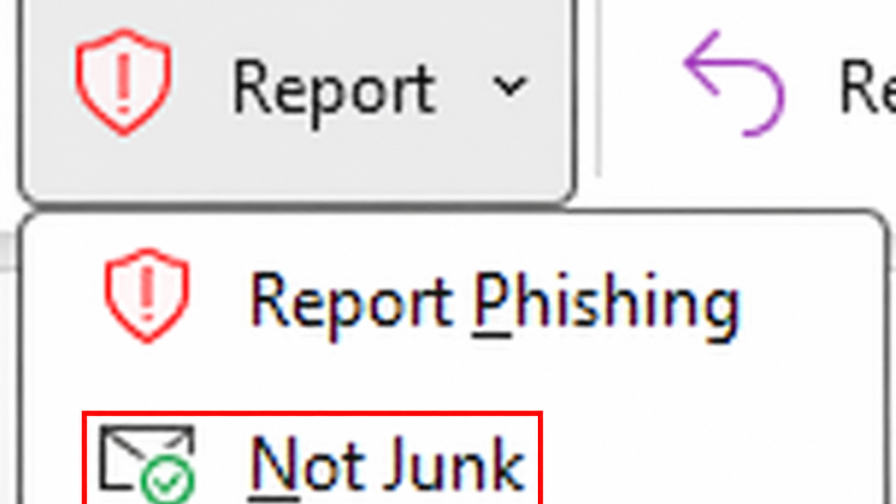
Menu names and locations may vary depending on your Outlook version and interface language.
An alternative way to add a safe sender
We recommend using Report → Not Junk as described above. It returns the message to your Inbox and may also help improve filtering across the organisation, so that legitimate messages reach the right folder in future.
Alternatively, you can add a sender to the Safe Senders list by selecting a message and choosing Block → Never Block Sender.
This setting applies to the mailbox in question. It does not change the Safe Senders lists of other mailboxes.
Remember shared mailboxes
Expand the shared mailbox in Outlook’s folder list on the left and check its junk folders.
Safe Senders lists also work in shared mailboxes. Add the sender to the shared mailbox’s list: adding a sender to your personal mailbox’s list does not affect the shared mailbox.
You can open a shared mailbox in a browser by following the IT Services instructions. Once the mailbox is open, follow the instructions in this notice to handle legitimate messages in the junk folders.
Adding a safe sender does not bypass all security checks or guarantee that every message will reach the Inbox. Continue checking junk folders regularly, even after adding safe senders.
Why do legitimate messages end up in the Junk Email folder?
Spam is a longstanding global problem. Automatic filtering reduces the amount of spam reaching your Inbox, but it cannot distinguish every legitimate message from spam without errors. As a result, legitimate messages can also end up in the Junk Email folder. The problem can be reduced, but it cannot be eliminated completely.
Best regards,
Helpdesk
In case of any inquiries related to this announcement or other IT matters at Metropolia, please contact the Helpdesk as follows:
Phone service: +358 9 7424 6777
Service requests: hd.metropolia.fi / helpdesk [at] metropolia.fi (helpdesk[at]metropolia[dot]fi)
Frequently Asked Questions: itservices.metropolia.fi/FAQ
Ask Mikko Anything (AMA): mikko.metropolia.fi